Showing posts with label SharePoint 2010. Show all posts

Wednesday, August 22, 2012

Update Modified / Created in List Item

I would like to migrate a site to another SharePoint Server as a site collection. Unfortunately, I cannot export the site using "Save site as template" (many issues needed to be solved, such as MaxTemplateDocumentSize). 

Apart from "Save site as template", I can choose between site collection backup and export site. For site collection, it includes fields Modified By, Created By, Created and Modified which are absent in site (*.cmp) file. In fact, I cannot move a site up one level without importing site file(*.cmp). Here is a method to update those fields programatically:

            SPListItem item = workflowProperties.Item;
            SPUser user = workflowProperties.Web.AllUsers[@"Test\wawa"];
            SPFieldUserValue currentUser = new SPFieldUserValue(workflowProperties.Web, user.ID, user.LoginName);
            item["Author"] = currentUser;
            item["Editor"] = currentUser;
            item.UpdateOverwriteVersion();

Monday, August 6, 2012

Custom DLL in SharePoint Solution 2010

I reference a custom DLL to a SharePoint Event Receiver solution. But, the event is not triggered when adding a list item. In the log file, an error log can be found:

Could not load type 'SAFP.SharedMethods' from assembly 'SharedMethods, Version=1.0.0.0, Culture=neutral, PublicKeyToken=5e96847a5abc7fb4'

As I have deployed the DLL to GAC already and included the assembly in web.config SafeControl, I have no idea what am I missing.

After asking my friend "Google", it tells me that something should be done on package inside SharePoint Project.

1. Click Package and then click Advanced button
2. Add additonal assmeblies

 
Then I upgrade the solution and everything works fine.

Monday, January 30, 2012

Enable basic authentication in IIS

Only basic authentication is available for connecting SharePoint Rest Interface in vCenter Orchestrator. Then, I go to IIS Manager and enable basic authentication under SharePoint website. But, the authentication method does not work actually. 


However, it works fine when I disable windows authentication. For your reference, 


Thursday, December 8, 2011

REST: Post XML to Update List Item

I need to use vCenter orchestrator to update item in SharePoint list.

Using rest plugin, I post the following XML to SharePoint.


   http://172.20.34.33/_vti_bin/listdata.svc/Rest(4)
    1
    2011-11-07T17:39:56+08:00


        0x0100B0118C4AF8B98C408EDC3A87238E73F5
        4
        4
  haha
        Item
        /Lists/rest


Tuesday, December 6, 2011

HTML in Calculated Column

In a SharePoint list, it looks up a Hyperlink column in another list. After my investigation, Lookup column only supports Text column and Calculated column. 

I decide to use Calculated column and render its content as html. Based on below references link, I add a script file to a content editor. But, it still failed.


After some time, I modify the script file and it works file.

Sunday, December 4, 2011

SPFieldUrl: Open URL in a New Window

When I add a hyperlink column in a list and add an item, I click its hyperlink. Then, it redirects current page to the link. But, I want to open a new window when clicking these links.

In fact, I cannot configure it inside SharePoint. After Googling, I discover it can be done by the following steps:

1. Go to folder "Microsoft Shared\web server extensions\14\TEMPLATE\LAYOUTS\XSL"
2. Open fldtypes.xsl
3. Change line '<a href="{$url}" >' to '<a target="_blank" href="{$url}" >'
3. Save the file and restart IIS

After that, I create a new hyperlink column, it opens a new window when clicking its link.

RenderPattern Element (Field Types)
SharePoint: Creating Custom SharePoint 2010 Field Types
How to: Create a Custom Field Type
Customizing the Rendering of a Custom SPField
What's New: Custom Field Rendering Enhancements

Sunday, November 13, 2011

Property Bag

SharePoint applications retrieve configuration settings at run time. Configuration database can be stored in the web.config or configuration database. Property Bag can be stored and retrieved configuration settings at the following levels:
-Farm
-Web Application
-Site Collection
-Site
-List

Reference:
SharePoint Property Bag Settings 2010

Managed code and Unmanaged Code

Managed Code
-It compiles to intermediate Language(IL)
-It runs and is managed by Common Language Runtime (CLR)
-The runtime provides services such as security, memory management and threading

Unmanaged Code
-It compiles directory to machine  code
-It does not run and is not managed by the CLR
-It doesn't get the  services of the runtime

Site Definition and Web Template

Web Template is stored in the Solutions Gallery of the site collection and the solution can also be deployed as a sandboxed solutions to other site collections.


Site definition consists of a combination of files that are placed in the %ProgramFiles%\Common Files\Microsoft Shared\web server extensions\14\TEMPLATE\SiteTemplates. You can adjust the physical storage capacity required by site collection.
(1) WebTemp*.xml
      Identify the site definitions and configurations and provide information about how they appear in the user interface (UI) to users who are creating new websites.
(2) Onet.xml
     Define the navigation areas, specify the list definitions available in the UI, specify document templates and their files, define the base types for lists, and define configurations and modules for site definitions.


Site Definition vs Web Template 
-The user context in which a web template is deployed does not have to have access to the file system of the servers.
-Custom web templates can be modified without affecting existing sites that have been created from the templates.

Master Page and Page Layout

The top-level SharePoint Server site for a site collection hosted on SharePoint Server 2010 has a special document library called the Master Page and Page Layout Gallery. All page layouts and master pages are stored in this document library. The Master Page and Page Layout Gallery supports versioning and workflow, so you can use those features for your master pages and page layouts.

(By default, SharePoint Server 2010 creates a master page gallery for every site; however, you can create only new pages with the page layouts stored in the master page gallery of the top-level site in the site collection).


Master page provide a consistent look and feel for your site. It contains controls that are shared across multiple page layouts, such as navigation, search and custom field controls.


Page Layout contains field controls and Web Parts. All page layouts reference a master page based on the CustomMasterUrl property of the SPWeb class.


Reference:
SharePoint Page Layouts and Master Pages (ECM)

Solution Deployment Security

There are two type of solution introduced in SharePoint 2010:


Farm Solution
In the manifest file, the solution must define that the assembly be deployed to GAC or Bin folder using DeploymentTarget attribute. Farm solution which is hosted in the IIS worker process (W3WP.exe) , run code that affect the whole farm. IIS application pool recycles before SharePoint retracts or deploys the feature.


1. Deployint Assembly to GAC (global assembly cache)
    Assemblies installed in the GAC run with Full trust and it is accessible to full set of object model. You must reset IIS every time you recompile assemblies.


2. Deploying Assembly to Bin folder using CAS
    Assemblies installed in the Bin folder of the application requires you to assign execution permissions. It is only accessible to subset of object model. You can create a custom policy file and SharePoint defines two trust levels : WSS_Minimal and WSS_Medium (local_drive:\Program Files\Common Files\Microsoft Shared\web server extensions\60\config). There are cases that deploying this solution is not suitable:
(1) Workflow
(2) Event receiver
(3) Timer job


Sandboxed Solution
    Sandboxed solution which is hosted in the SharePoint user code solution worker process (SPUCWorkerProcess.exe), run code that can only affect the site collection of the solution. It is not necessary for the SPUCWorkerProcess process to recycle to load the latest version of the solution. There are the most common things that sandboxed solution cannot  do:
(1) Connect to resources that are not located on the local farm
(2) Access a database
(3) Change the threading model
(4) Call unmanaged code
(5) Write to dick
(6) Access resources in a different site collection


References:
Moss 2007 and Code Access Security
Microsoft Windows SharePoint Services and Code Access Security
Differences Between Sandboxed and Farm Solutions
Sandboxed solutions overview (SharePoint Server 2010)
Chapter 4: Sandboxed Solutions
Farm Solutions

Monday, May 30, 2011

SharePoint foundation: deploy a event handler for custom list

There are severals methods to deploy event handler in SharePoint:
(1) deploy through Visual Studio 2010
(2) deploy solutions through stsadm command

Link an event handler to a specific list
When you create an evnet handler, you cannot find any custom list name in event source.


You select Custom List and press button Finish. After the creation of event handler, you can double click the Elements.xml under EventReceiver1.


Then, you need to change the line from

       <Receivers ListTemplateId="104">

to

      <Receiver ListUrl="List/helloWorld">

 Now, the event handler is linked to the list helloWorld


Deploy the event handler through Visual Studio 2010


There is only one step you need to do: right click the solution and select Deploy. Then, Visual Studio 2010 will deploy and activate the solution automatically.

Deploy the event handler though stsadm

(1) add solution

(2) deploy solution
   
(3) activate the solution


     Go to Site Settings -> Manage site features and press button Activate for the solution


Reference: http://patrickboom.wordpress.com/2010/05/31/using-powershell-to-deploy-sharepoint-solutions-wsp-2/

SharePoint foundation: deploy a workflow in sharepoint

There are several steps needed to deploy workflow solutions manually by stsadm command.

1.  add a solution into SharePoint

 
2. deploy the solution into SharePoint


3. execute the time job


4. Go to Site Settings -> Site Collection Administration -> Site collection features and activate the feature


5. Go to Site Settings -> Site Administration -> Workflows, the status of the feature is active


Monday, May 2, 2011

Event Handler: The object cannot be created from sandboxed code assembly

I create an solution of event handler whose name is "eventHandler-v1.0" and then bind the event handler to a list in SharePoint.

When I start debugging the solution in Visual Studio 2010, an error message is shown as below
"Error creating instance of sandboxed code object. The object cannot be created from sandboxed code assembly."


I suspect the problem comes from the name of my solution which contains '.', so  I try to create a solution whose name without '.' and everything works fine.

Monday, April 18, 2011

Event Handler: Enable Error Message

In SharePoint, event handler is triggered before or after a specific event, A cancel update (properties.Cancel) is an unhandled exception for SharePoint and error message is shown as below:


The following code will be triggered before adding a field and an error message will be shown as below.

public override void FieldAdding(SPListEventProperties properties)
        {
            properties.ErrorMessage = "error”;
            properties.Cancel = true;
        }

By default, the error message will be shown as below when the attributue of CallStack is true in web.config (a xml document defines configuration of the web application). The error message will show the exception detail when admin enables the CallStack attribute


If I update the attribute of CallStack to “false”, the information for debugging will be totally hidden.


References:

Tuesday, April 5, 2011

Excel Service REST: authentication in C#

The service reference of excel service in SharePoint Server 2010 is

http://sp2010/_vti_bin/ExcelService.asmx

I add above service reference in a console application. The code in the application is shown below:

ExcelServiceSoapClient client = new ExcelServiceSoapClient();
client.ClientCredentials.Windows.AllowedImpersonationLevel =           System.Security.Principal.TokenImpersonationLevel.Impersonation;
String url = "http://sp2010/excelFiles/Book1.xlsx";
Status[] status;
String session = client.OpenWorkbook(url, "en-US", "en-US", out status);
When I runs the above code, method OpenWorkbook() throws an MessageSecurityException as below:

The HTTP request is unauthorized with client authentication scheme 'Anonymous'. The authentication header received from the server was 'Negotiate, NTLM'.
The message indicates the problem is related to the authentication method. Go to app.config and change the security settings.

<security mode="TransportCredentialOnly">
<transport clientCredentialType="Ntlm" proxyCredentialType="Ntlm"  realm="" />
      <message clientCredentialType="UserName" algorithmSuite="Default" />
</security>
 If you do not want to use current window authentication, you can specify a username account.

client.ClientCredentials.Windows.ClientCredential = new System.Net.NetworkCredential(username, password, domain);
                client.ClientCredentials.Windows.AllowedImpersonationLevel = System.Security.Principal.TokenImpersonationLevel.Delegation;    

Sunday, March 27, 2011

SPSite: FileNotFoundException was unhandled

I create a console project in Visual Studio 2010.

After adding a reference to Miscrosoft.SharePoint, I add following code in the project:


When it opens a SPSite, FileNotFoundException is thrown as below:


Since the console project set the Platfrom target is X86 as default and I run the project under X64 environment. Therefore, I need to update the Platform target to x64.

1. Right click the project
2. Click Properties
3. Click Build and update the value in Platfrom target


Saturday, March 26, 2011

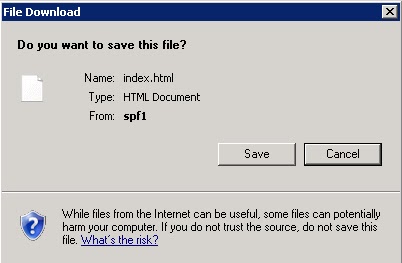
Enable to browse html file

I upload html files to a document library, then I try to open a html file. A file download message is shown below:


How can I browse the html file in SharePoint directly?

1. Go to Central Admin\Application Management\Manage Web Applications
2. Select General Setting for the SharePoint Web Application
3. Select permissive under Browser File Handling


Saturday, March 5, 2011

CAML Query: FieldRef Element

The CAML  FieldRef contains DisplayName and Name respectively.

DisplayName refers to the name shows in the browser.


Name refers to the internal name which cannot be changed once you create it. If you do not modify it before, Display and Name are the same. 

On the other hand, if you modify it, you can find the Name through the link shown in the browser.First, you can click the column that you want to know its Name. Then, you will discover that the link shown in the browser have changed. 


In the above picture, the value of SortField equals the Name of the column.
In the CAML Query, it uses Name to search items only. Therefore, do not use DisplayName to do a query.


REST: Data service client code-generation failed: Schema specified is not valid

When I add REST Interface as a service reference in a c# projcet, an error message is shown below:


In the above message, it tells me that "Schema specified is not valid". "__x_notify_Item" is invalid"  shows that a list named "__x_notify" contains some special characters which is not accepted by the schema. 


Delete the specified list, the problem will be solved.